


Vico Nature: Smart Nature View
4.1201.00 Reviews
App Specs
- Version
- 1.1.0
- Updated On
- License
- Free
- Downloads
- 100,000+
- Developer
- VicoTech
- Categories
- Tools
- Platform
- Android
Screenshots
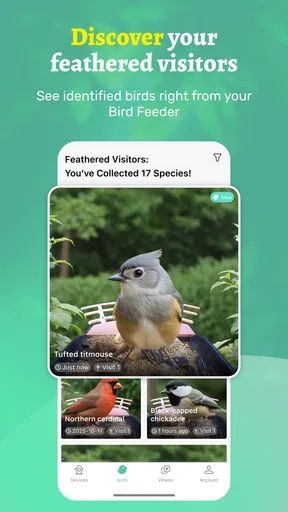
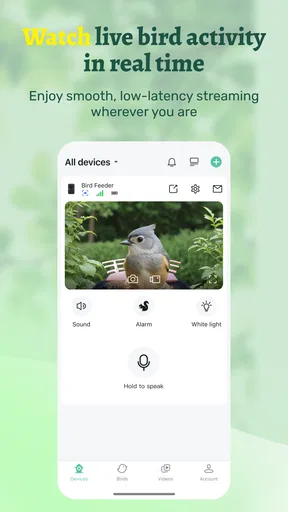
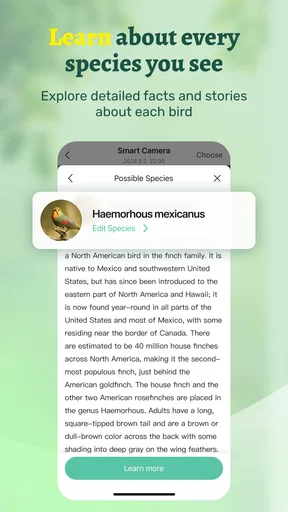
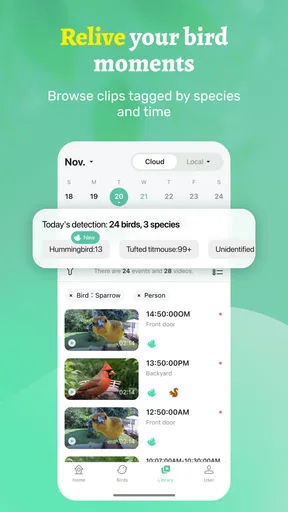
 Analysis by AppCompare
I spent time with Vico Nature: Smart Nature View as a practical bird-watching tool rather than treating it like a general social or photography app. Its purpose is focused: it helps me see and record birds at home or while I am away. That narrow idea is also its main appeal. I do not have to turn a casual sighting into a complicated project, and the app feels aimed at people who want a simple way to keep an eye on nature around them.
Developed by VicoTech, this free Tools app is available for users aged Everyone and supports devices running Android 7.0 or later. The current release is version 1.1.0, and the app has already passed the 100K+ install mark. Its average rating is 4.1 from over 500 ratings, with more than 200 written reviews, which suggests that it has found a useful audience while still leaving room for different experiences depending on the phone and the way someone uses it.
How Vico Nature feels during ordinary use
The first thing I noticed is that the app’s value depends less on constant interaction and more on being ready when something interesting happens. Bird watching is often an activity of waiting. A bird may appear for a few seconds, disappear behind a feeder, and never return at the exact moment I expect. An app built around seeing and recording that moment needs to stay understandable, avoid unnecessary friction, and make the transition from watching to saving an observation feel natural.
That makes Vico Nature different from a standard camera app. A phone camera is useful when I already know what I want to capture, but a nature-focused tool is more relevant when the subject is unpredictable. I can use it as part of a routine at a window, in a garden, on a balcony, or while checking a familiar outdoor spot from somewhere else. The store summary describes seeing and recording birds at home or away, and that gives the app a practical role beyond a one-time photograph.
I would not describe it as a complete replacement for every birding tool. Someone who wants deep species identification, a large observation database, field guides, mapping, or advanced photography controls may prefer a dedicated alternative. Vico Nature makes more sense for the person who wants a straightforward viewing and recording experience without building an entire naturalist’s library around it.
Speed expectations when a bird appears
With an app like this, perceived speed is not only about how quickly a screen opens. The more important question is whether I can get to the useful view before the bird leaves. In practice, I would keep the app prepared during a period when birds are active rather than opening it only after spotting movement. That small habit reduces the risk of missing a short visit and is more realistic than expecting any mobile app to remove every delay caused by the phone, connection, or camera setup.
The interface is easiest to judge during short, repeated sessions. I might check the view in the morning, leave it alone, then return later to record another visit. This pattern is less demanding than keeping the phone active for a long observation period, and it suits the app’s purpose well. I found that the best experience comes from treating it as a quick observation companion, not as a replacement for a dedicated always-on wildlife camera.
Worth Reading Before You Choose

EA SPORTS FC Mobile 26 Is a Bigger Football Game, but It Takes Time

Flipboard Shows What News Apps Must Do Beyond the Feed

Switching to Android Auto Means Rethinking Your Driving Routine

Google Calendar Makes a Crowded Week Easier to Manage

Ludo King Makes the Most of the Minutes Between Plans

Baby Panda World Brings Quick Play to Modern Phones, but Its Game Library Feels Busy
A useful tip is to decide in advance what counts as a worthwhile recording. If I try to save every movement, the collection becomes noisy and difficult to review. Recording a clear visit, an unusual behavior, or a bird that rarely appears gives the app more value than pressing the record control for every brief blur outside the window.
What happens during heavier use
Longer sessions are where expectations need to be realistic. Watching birds continuously can place more demand on a phone than checking a short clip or making a single record. Screen activity, camera use, and any connection involved in viewing from another location can all matter, even when the app itself is designed to be simple. I would therefore use a stable surface, keep the phone connected to power when appropriate, and avoid assuming that a normal pocket setup is ideal for extended observation.
This is especially important if the phone is being used as the viewing device near a window. A bright display can make a phone warm in direct sun, while a weak position can cause interruptions that look like app problems but are really caused by the environment. Placing the device in shade and giving it a clear, steady angle is a basic change that improves the overall experience without requiring extra equipment.
For remote checking, the trade-off is convenience versus dependence on the setup at home. Seeing what is happening while I am away is useful, but the quality of that experience depends on the phone or viewing position remaining suitable at the other end. I would not use the app as the sole safeguard for a valuable bird-feeding setup or as a substitute for dedicated monitoring hardware. It is better understood as a convenient way to check and record nature, not as a guaranteed surveillance system.
Another practical workflow is to separate observation from cataloging. I can first watch without interrupting the moment, then save only the records that are worth keeping. This prevents the app from becoming a stream of near-identical entries and makes later browsing more meaningful. It is a small discipline, but it matters when an app is used repeatedly over weeks rather than just once.
Stability and recovering from interruptions
Reliability matters more here than flashy presentation because a missed visit cannot always be repeated. I look for an app that is easy to return to after a pause, a phone call, a screen lock, or a change between home and away use. Vico Nature’s focused purpose helps: there are fewer reasons to wander through unrelated sections while I am trying to get back to bird viewing.
Still, I would approach recovery sensibly. If an observation is important, I would check that it has actually been recorded before closing the app or moving to another task. I would also avoid assuming that an interrupted viewing session automatically becomes a complete saved record. A quick confirmation habit is more dependable than relying on memory, especially when the bird has already flown away.
When something does not behave as expected, the first checks should be ordinary ones: confirm that the phone still has a suitable connection for the task, make sure the device has not entered a restrictive power-saving state, and reopen the relevant view if the session has been interrupted. These are not special fixes for Vico Nature; they are sensible steps for any mobile tool used for live or remote viewing. The app is most convincing when I use it within those limits rather than expecting it to overcome every device or network issue.
The current version, 1.1.0, is a useful detail for anyone deciding whether to install it, but I would not treat a version number as a promise of identical behavior on every phone. Android devices differ widely in age, screen behavior, camera hardware, memory, and battery condition. A recent or well-maintained phone is likely to provide a more comfortable experience than an older device operating close to its limits.
Older phones, battery use, and practical constraints
Support for Android 7.0 or later gives the app a broad compatibility range, which is helpful for people who keep an older spare phone near a window or feeder. At the same time, operating-system compatibility does not guarantee that every older device will feel equally responsive. A phone may meet the minimum system requirement while having limited battery capacity, modest processing power, or a screen that is difficult to see outdoors.
I would consider using a spare device if the goal is to leave a viewing point in place. That can be more convenient than tying up my everyday phone, especially when I want to remain available for calls, navigation, or other tasks. The trade-off is that the spare phone still needs a sensible position and enough power for the intended session. If it becomes hot, loses charge quickly, or is exposed to weather, the problem is not solved simply by having the app installed.
Storage planning also deserves attention when recording regularly. Even without assigning a specific amount of space, repeated recordings can accumulate. I would review older material from time to time and keep the clips or observations that have personal value. This is particularly useful for families or children who enjoy comparing visits, because a smaller, organized collection is easier to revisit than an unfiltered archive.
People who are sensitive to battery drain should use shorter observation windows and avoid leaving the display active unnecessarily. Someone who needs constant monitoring, automatic long-term capture, or a weather-resistant setup would be better served by dedicated hardware designed for that job. Vico Nature is more suitable for a phone-based approach where convenience and occasional observation matter more than continuous unattended operation.
Useful routines for home and away viewing
At home, I would start with a repeatable location. A feeder, garden edge, or quiet window gives the app a consistent purpose and makes changes easier to notice. Rather than moving the phone every time, I would first improve the angle and reduce reflections. A stable viewing point makes short visits more comparable and reduces the temptation to adjust the device while a bird is present.
When away, the app’s appeal is different. I can check a familiar home view without being physically beside it, which is useful if I am visiting family, working elsewhere, or simply curious about activity during a normal day. The limitation is that remote convenience depends on the home arrangement remaining available and the connection being good enough. I would use it for casual checking and personal records, not for urgent decisions or situations where a missed view would have serious consequences.
A less obvious benefit is that the app can support observation habits without requiring expert knowledge. I can record when birds appear, compare visits over time, and learn from repeated patterns through my own notes and memories. It does not need to turn every moment into a formal scientific entry to be useful. For a beginner, that lower barrier may be more encouraging than opening a specialist app filled with terminology before they have even developed an interest.
For children, the Everyone age rating makes the app easier to consider as a shared family activity, although I would still supervise how a child handles the phone and any recordings. The best use is collaborative: one person watches, another decides what is worth saving, and everyone later reviews the most interesting moments. That turns a passive screen activity into a reason to pay attention to the real outdoor environment.
Where it beats ordinary alternatives, and where it does not
The usual alternative is the phone’s built-in camera. That option may be better for a single high-quality photograph because it is already familiar and often offers more general shooting controls. Vico Nature has a different advantage: it is organized around observing and recording birds, so I do not have to adapt a general camera workflow every time I want to check a familiar spot.
A second alternative is a dedicated bird-watching or wildlife camera. Those products can be stronger for long unattended sessions, outdoor placement, specialized capture, or detailed identification. They may also cost more and require more setup. Vico Nature is attractive when I already own an Android phone and want to begin with a free app rather than buy separate equipment. That convenience is real, but it should not be confused with the capabilities of purpose-built hardware.
There are also specialist birding apps that focus on identification, calls, species information, or structured logs. I would choose one of those if my main question were “What species is this?” or if I wanted a more formal record of every sighting. I would choose Vico Nature when the main activity is seeing what is happening and preserving selected moments. The right choice depends on whether viewing or identification is the center of the experience.
The app is free to install, while in-app purchases range from $0.99 to $99.99 per item. That makes it important to look carefully at any purchase prompt and decide whether the added value fits the way I plan to use the app. A casual user may be satisfied without spending anything, while a committed user should consider the cost of optional items as part of the longer-term decision rather than assuming every useful function is included at no charge.
Who should install it
I would recommend Vico Nature to someone who enjoys birds but does not want a complicated field system. It is a good fit for a home window, balcony, garden, or familiar outdoor area where I want to check activity and save selected observations. It also suits beginners who need a simple starting point and families looking for a reason to observe nature together.
I would be more cautious recommending it to a serious birder who needs detailed species tools, advanced image control, a structured scientific log, or dependable continuous monitoring. Those needs point toward specialist software or dedicated equipment. The same is true for anyone using an older phone with a weak battery and expecting long sessions without power management or careful placement.
After using it, my main advice is to begin with a short, controlled routine. Pick one observation point, keep the phone steady, test a brief session, and see whether the viewing and recording flow suits you. Then decide whether remote checking or longer sessions are worth the extra demands on the device. This approach also makes it easier to judge whether any optional in-app purchase is genuinely useful instead of paying before understanding your own habits.
My overall impression is that Vico Nature succeeds by staying close to one clear idea: making bird viewing and recording approachable at home or away. Its performance is best when expectations match that role. I would not depend on it as a professional wildlife-monitoring system, but I do see the appeal for everyday observation, especially when I want something simpler than a specialist birding platform and more purposeful than a standard camera.
With a 4.1 average and over 100K+ installs, it has enough adoption to make it worth considering, though those figures should not replace a personal test on the phone I intend to use. VicoTech’s app is free, supports Android 7.0 and newer, and carries an Everyone rating, so the entry barrier is low. My verdict is positive for casual and regular bird watchers who value convenience, with one clear condition: treat device placement, battery, connection, and recording habits as part of the experience. Used that way, it is a focused and friendly tool rather than an overpromising substitute for dedicated wildlife gear.
Pros
- Identifies plants
- animals
- and fungi from photos in seconds.
- Nature guides add useful context for curious beginners.
- Simple interface makes scanning outdoors quick and accessible.
- Can encourage children and families to explore local wildlife.
- Photo-based searches are convenient when carrying field guides is impractical.
Cons
- Identification results may be inaccurate with blurry or unusual specimens.
- Some species information or features may require an internet connection.
- Coverage can vary by region
- especially for less common wildlife.
- Privacy-conscious users may dislike uploading photos for analysis.
- Advanced naturalists may find the database and tools too limited.
FAQs for Vico Nature: Smart Nature View
What is Vico Nature: Smart Nature View?
Vico Nature: Smart Nature View is an app designed to bring a nature-inspired visual experience to your device. It may provide relaxing backgrounds, scenic imagery, or smart viewing features focused on landscapes and natural environments. Before downloading, users should check the current store description because the available tools, supported devices, and exact customization options can vary between Android and iOS versions.
Does Vico Nature: Smart Nature View work offline?
Some nature-viewing features may work without an internet connection after the required images or content have been downloaded, but this depends on how the app delivers its backgrounds and visual material. Online access may still be necessary for updates, new scenery, advertisements, synchronization, or additional content. It is worth opening the app settings and reviewing its download and data-use behavior before relying on it while traveling.
Is Vico Nature: Smart Nature View free to download and use?
The application may be available as a free download, but free access does not always mean that every feature is included. Depending on the version, users could encounter advertising, optional purchases, premium scenery, subscriptions, or limits on customization. We recommend checking the Google Play Store or Apple App Store listing carefully for pricing, in-app purchase details, and subscription terms before installing or starting a trial.
Does the app affect battery life or device performance?
Nature-focused visual apps can use additional battery, memory, and processing power, particularly when they display animated scenes, refresh content automatically, use location services, or remain active in the background. On newer devices, the impact may be modest, while older phones could experience faster battery drain or reduced smoothness. Users should review background permissions and disable unnecessary effects if performance becomes an issue.
What permissions does Vico Nature: Smart Nature View require?
The permissions requested by Vico Nature: Smart Nature View depend on the features included in the installed release. A basic visual app may only need access to storage, notifications, or network connectivity, while location or other permissions could be requested for personalized content. Before accepting, users should read each permission prompt and deny access that is not necessary for the app’s intended nature-viewing functions.


